Stop Losing ₹30 Lakh+ Every Year from Webinar Leads That Slip Away
If you're a digital coach or marketer running webinars, you're already spending lakhs on ads. But what happens after someone registers?
The Harsh Truth:
- • 70% of your leads never get a follow-up call
- • Your team forgets to send reminders
- • Excel sheets are a mess, WhatsApp is chaos
- • You have NO IDEA who's working and who's not
What Changes With WLH:
- ✅ Convert 3X more leads with zero manual work
- ✅ Save 20+ hours/week - no more spreadsheets
- ✅ Know exactly which team member is slacking
- ✅ Automated WhatsApp follow-ups that actually convert
👉From ₹10L to ₹40L monthly revenue. Same webinar. Same leads.
Watch: Real coaches sharing their revenue transformation
Higher Conversion Rate
Hours Saved Per Week
Additional Revenue/Year
Leads Left Behind
Stop Wasting Money on Leads That Get Lost in Excel Sheets
Every lead you lose is ₹2,000-₹50,000 in lost revenue. WLH ensures EVERY single person who registers gets followed up — automatically.
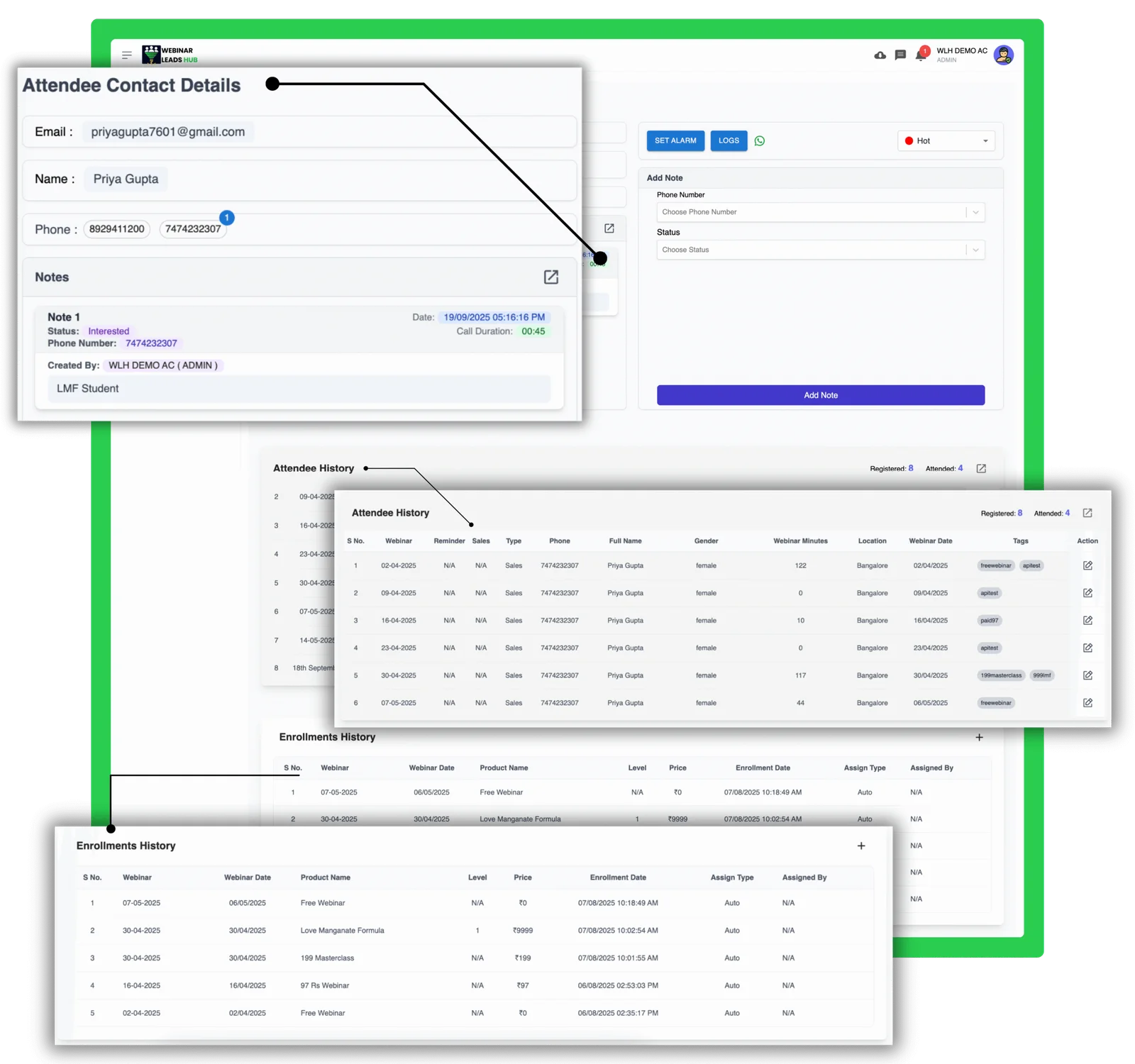
Before WLH
Leads scattered across 5 different tools. Team manually copying data. 60% leads never followed up.
After WLH
One dashboard. Auto-import from any platform. 100% follow-up rate. Team knows exactly what to do.
Revenue Impact
If you get 1000 leads/month at ₹20K average sale = ₹60 lakh extra revenue/year
Know EXACTLY Which Leads Will Buy (And Focus Only On Them)
Stop wasting time on cold leads. WLH shows you Hot, Warm, Cold classification so your team calls the right people at the right time.
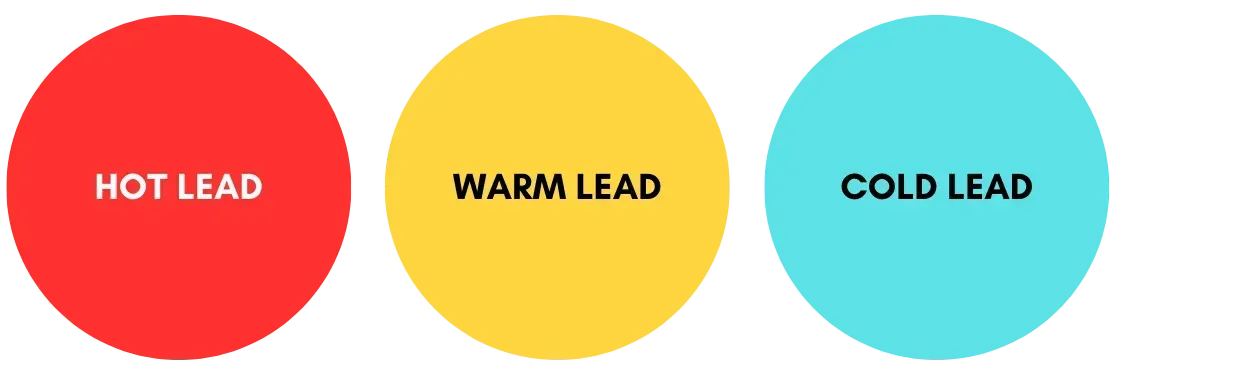
Stop Wasting Time on Wrong Leads
Your team marks Hot, Warm, Cold leads instantly. Focus energy on people ready to buy, not tire-kickers.

Turn Repeat Attendees Into Paying Clients
See who's attended 5 webinars but never bought. These are your HOTTEST leads — call them first!

Never Call The Same Person Twice
Multiple numbers? No problem. See all contact history. Avoid annoying repeat calls that kill conversions.
Zero Manual Work. Every Lead Gets Assigned Instantly.
New lead registered at 11 PM? WLH assigns it instantly. Your team wakes up with fresh leads to call. No delay. No loss.
❌ Old Way (Manual Hell)
- • Someone registers at night
- • Sits in Excel sheet till next day
- • You manually assign at 11 AM
- • Team member calls at 3 PM
- • Lead bought from competitor by 2 PM
Result: Lead lost. ₹20K gone.
✅ WLH Way (Automatic)
- Someone registers at 11 PM
- Auto-assigned to team member in 2 seconds
- Team member gets notification at 8 AM
- First call made by 8:30 AM
Result: You got the sale. ₹20K earned.
How It Works (3 Simple Steps):
Create Webinar
Set up your webinar in WLH
Enable Auto-Assign
Turn on automation in settings
Forget About It
Every lead auto-assigned forever
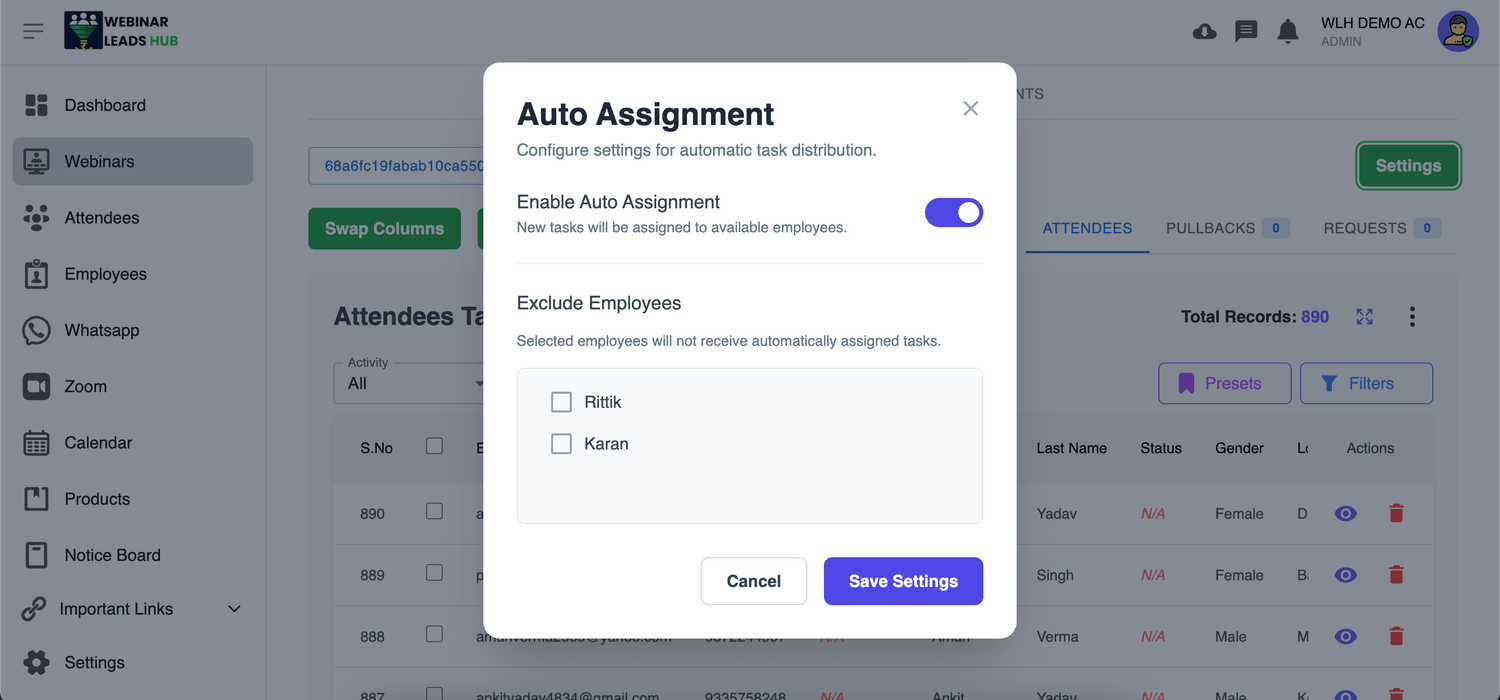
Save 3+ Hours Every Day. Never Miss a Lead Again.
Your Team Will NEVER Forget to Follow Up Again
Most leads don't buy immediately. They need 3-5 follow-ups. WLH reminds your team automatically. Zero human error. Maximum conversions.
😱 The Forgotten Follow-Up Problem
Your team member calls a lead:
"Sir, call me after 3 days, I'll decide"
Your team member says "Sure!" ...and forgets completely.
That's a ₹20,000 sale gone. Multiplied by 50 leads per month = ₹12 Lakh lost per year.
Why Humans Forget:
- ✗ Too many leads to track
- ✗ Sticky notes get lost
- ✗ "I'll remember" = They won't
- ✗ No system = Chaos
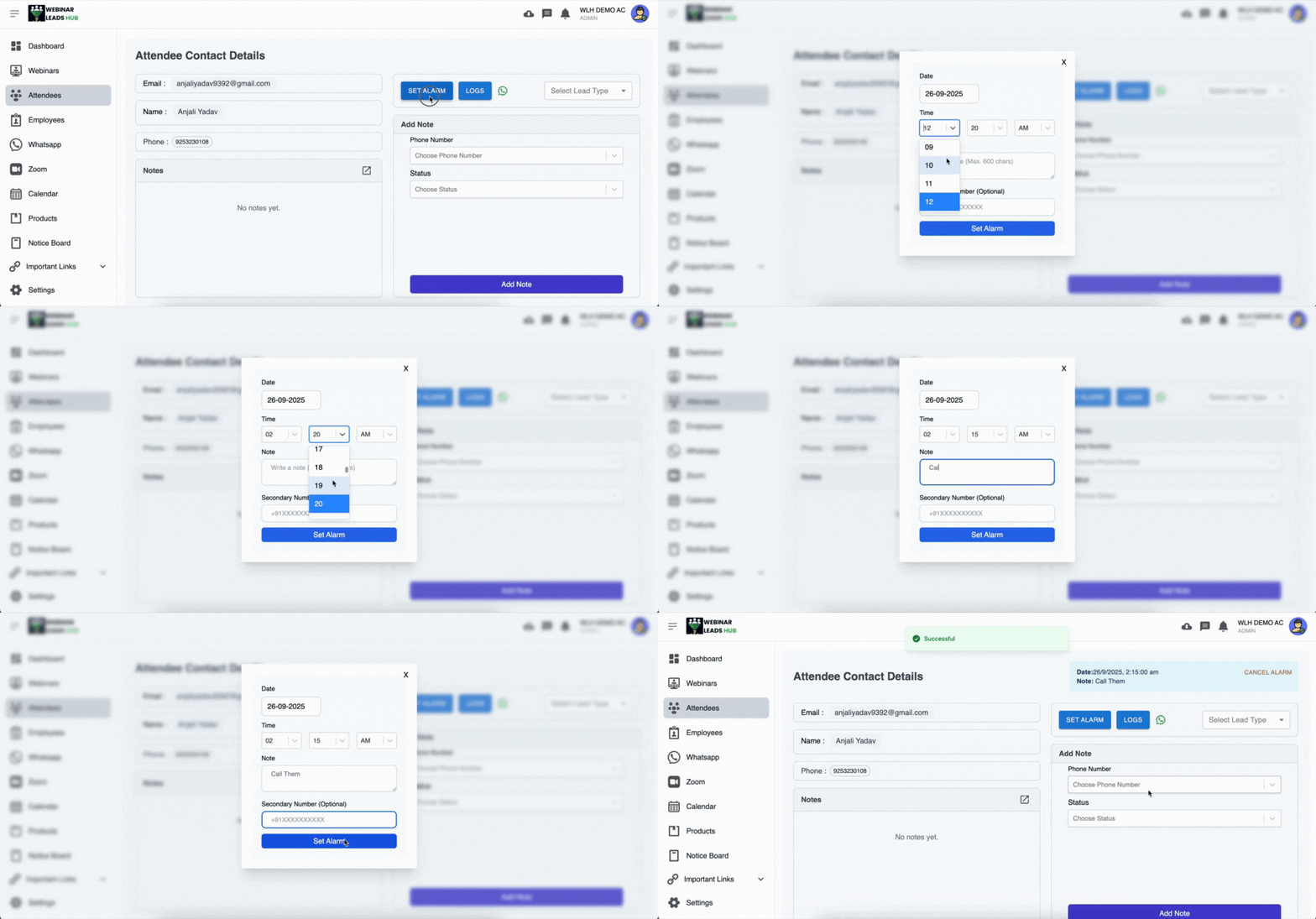
Set Reminder in 5 Seconds
Team member clicks "Remind me in 3 days at 10 AM". Done. System handles rest.
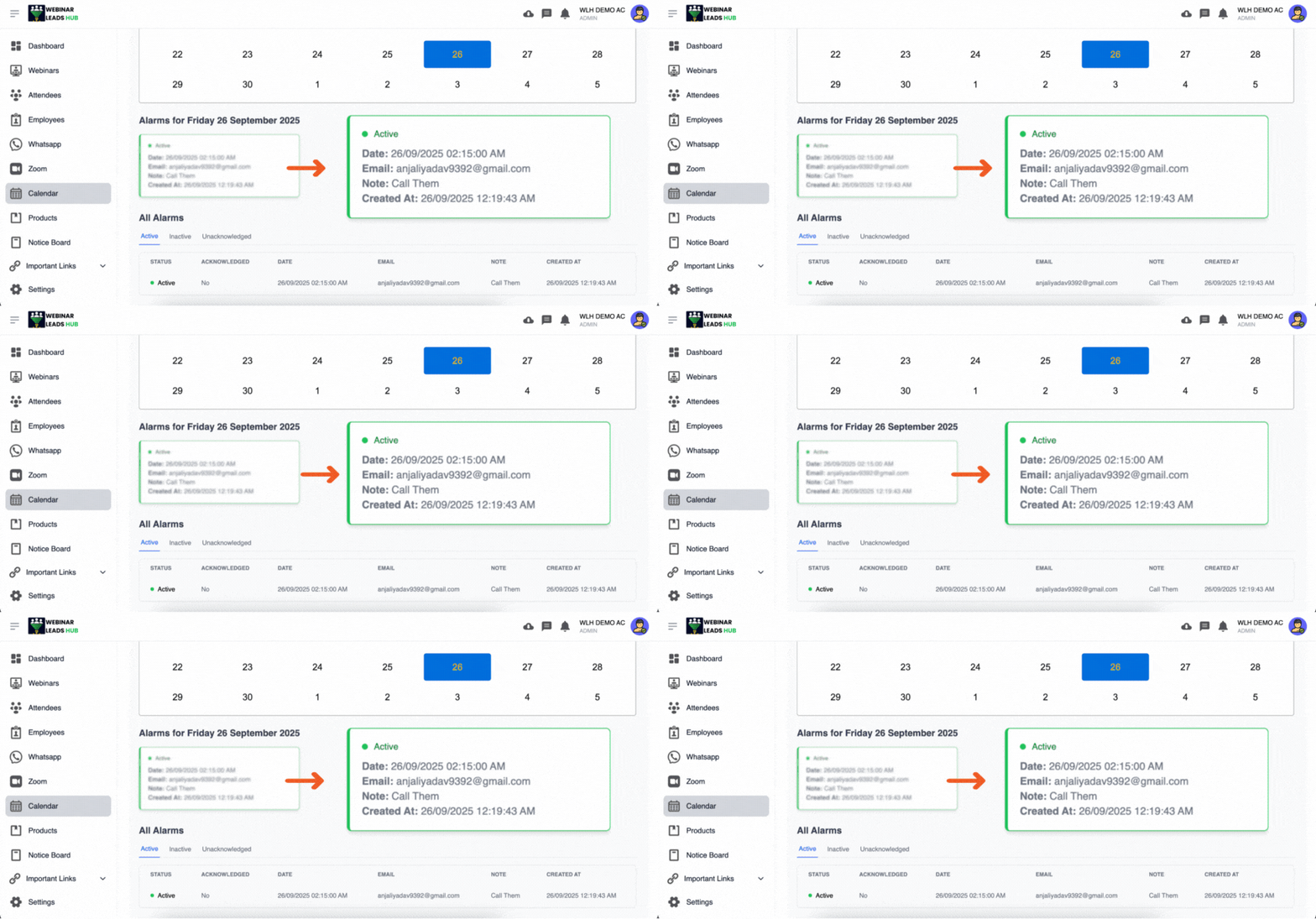
Calendar + Alerts Working Together
See all follow-ups in calendar. Get WhatsApp alerts. Never miss a single callback.
The Result?
Follow-up completion rate
Recovered revenue per year
Leads falling through cracks
Get Real-time status, call logs, and clear follow-ups — all in one place
WLH makes follow-ups crystal clear by showing you exactly what's happening with each lead
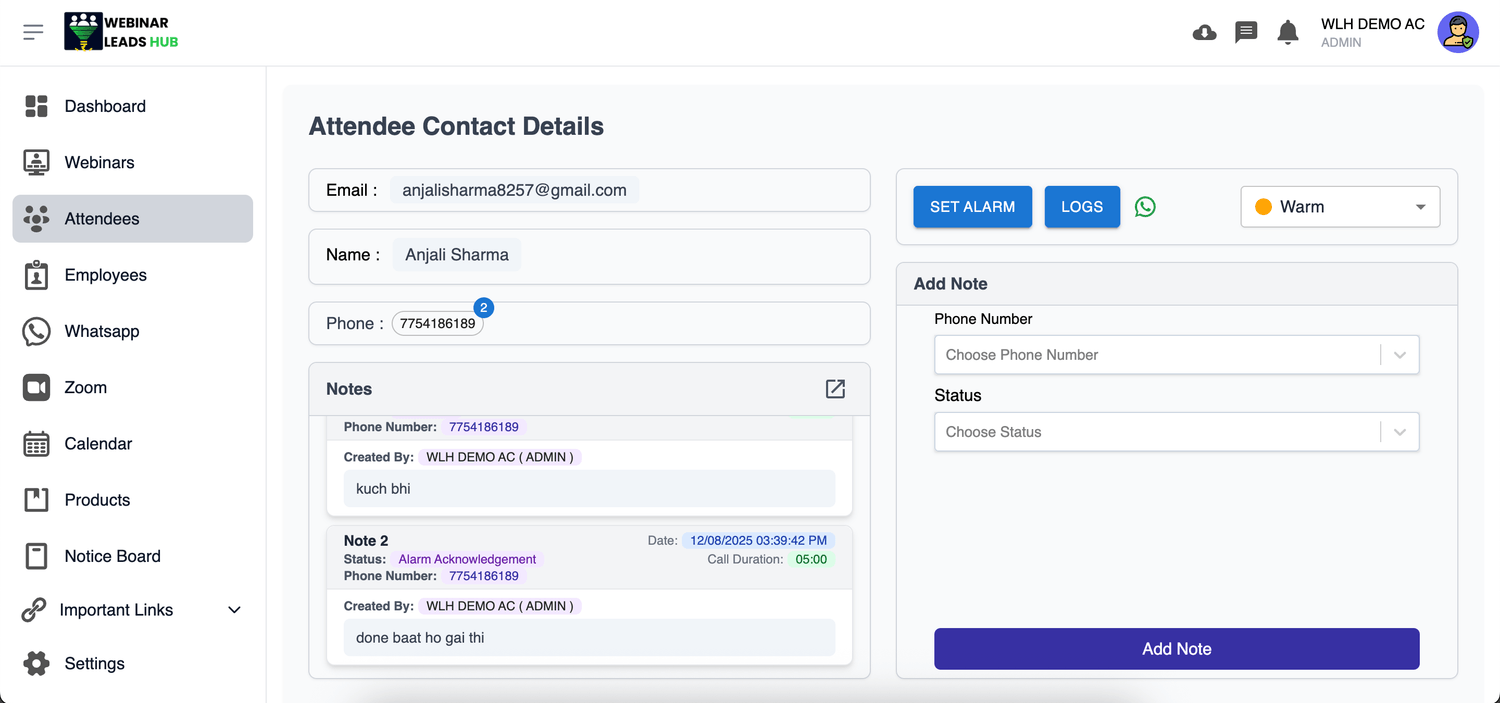
Live Status Updates
See the real-time stage of every lead your team is handling.
Call Notes & Comments
Track what was discussed so nothing gets missed in the next follow-up.
Call Duration Records
Know how long each lead interaction lasted.
Send 10,000 WhatsApp Messages in 10 Minutes (Legally & Without Ban)
Imagine sending personalized reminders to ALL your leads via WhatsApp — automatically. No manual typing. No getting banned. Official Meta integration.
❌ Without WhatsApp Automation
- • Manually send messages one by one
- • Takes 8+ hours to message 1000 people
- • WhatsApp bans your number
- • 80% people never see your message
- • Miss the webinar start time
Result: Low show-up rate = Low sales
✅ With WLH WhatsApp API
- Send 10,000 messages in minutes
- Personalized with name, webinar time, link
- 100% Meta-approved (no ban risk)
- Scheduled auto-reminders (1 hour before, 10 min before)
Result: 50% higher show-up = 3X more sales
Official Meta Technology Partner — 100% Safe & Compliant
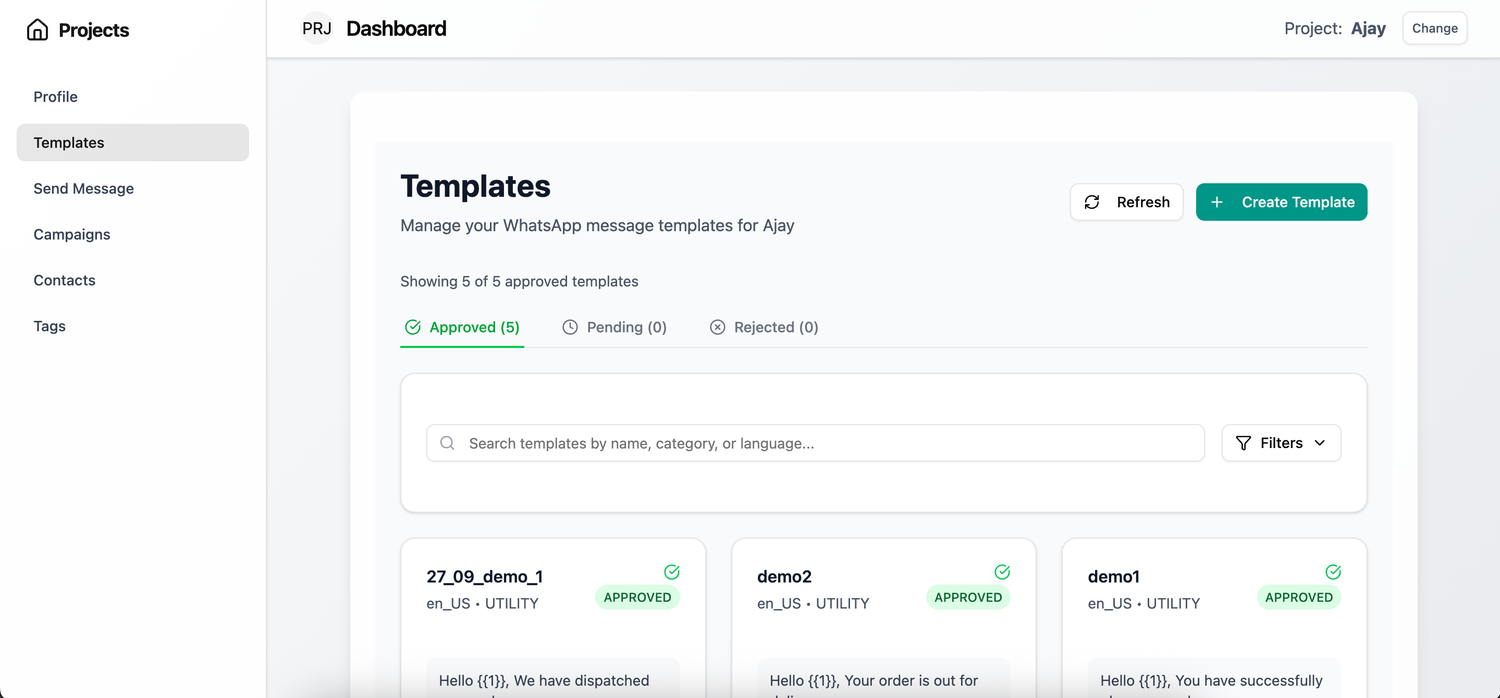
Pre-Built Templates
Use ready-made templates for reminders, offers, follow-ups. Just customize and send.
Benefit: Save 5 hours/week
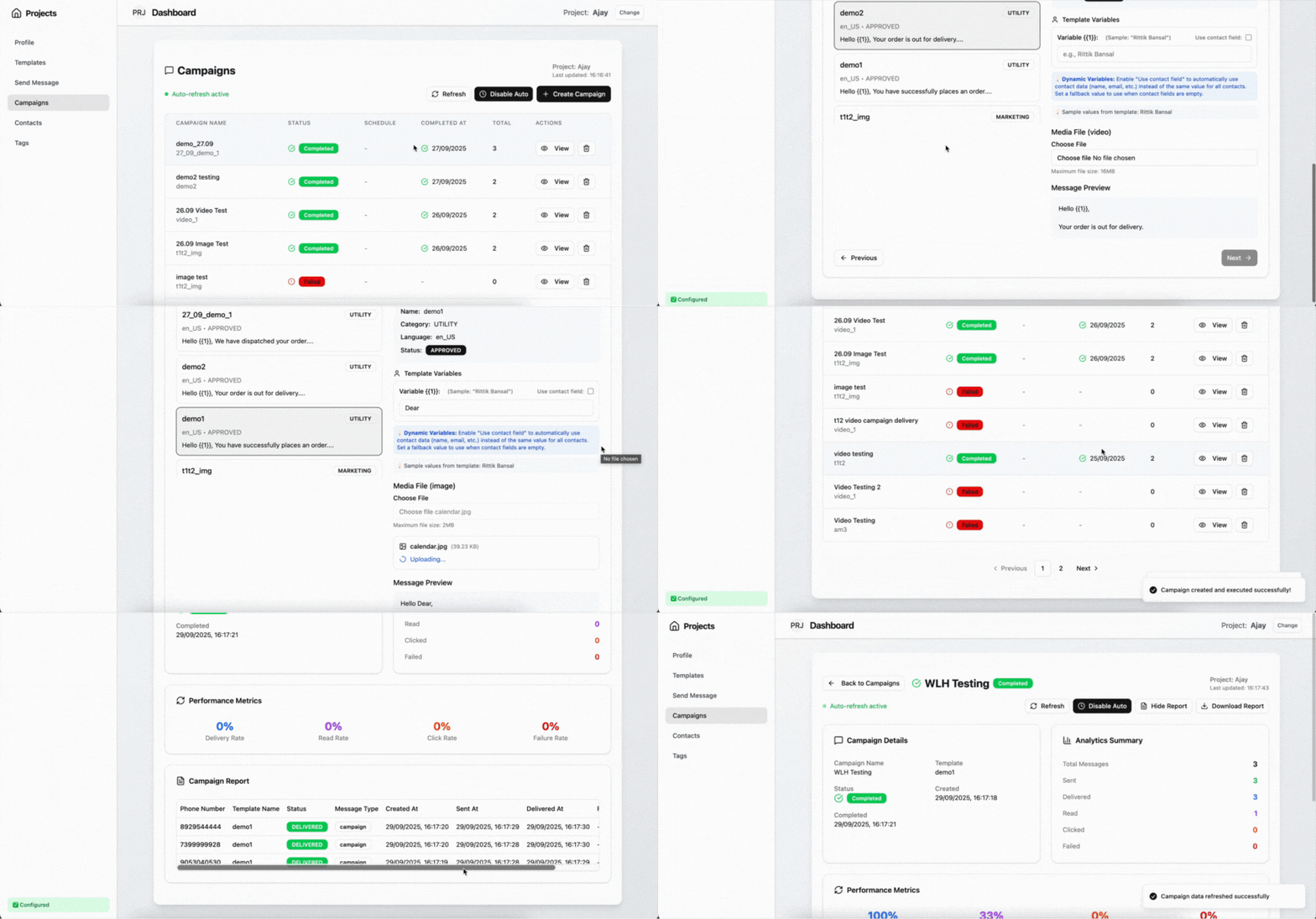
Bulk Campaigns
Send broadcast to 5000 people. Schedule for later. Track who opened, clicked, replied.
Benefit: Know what's working
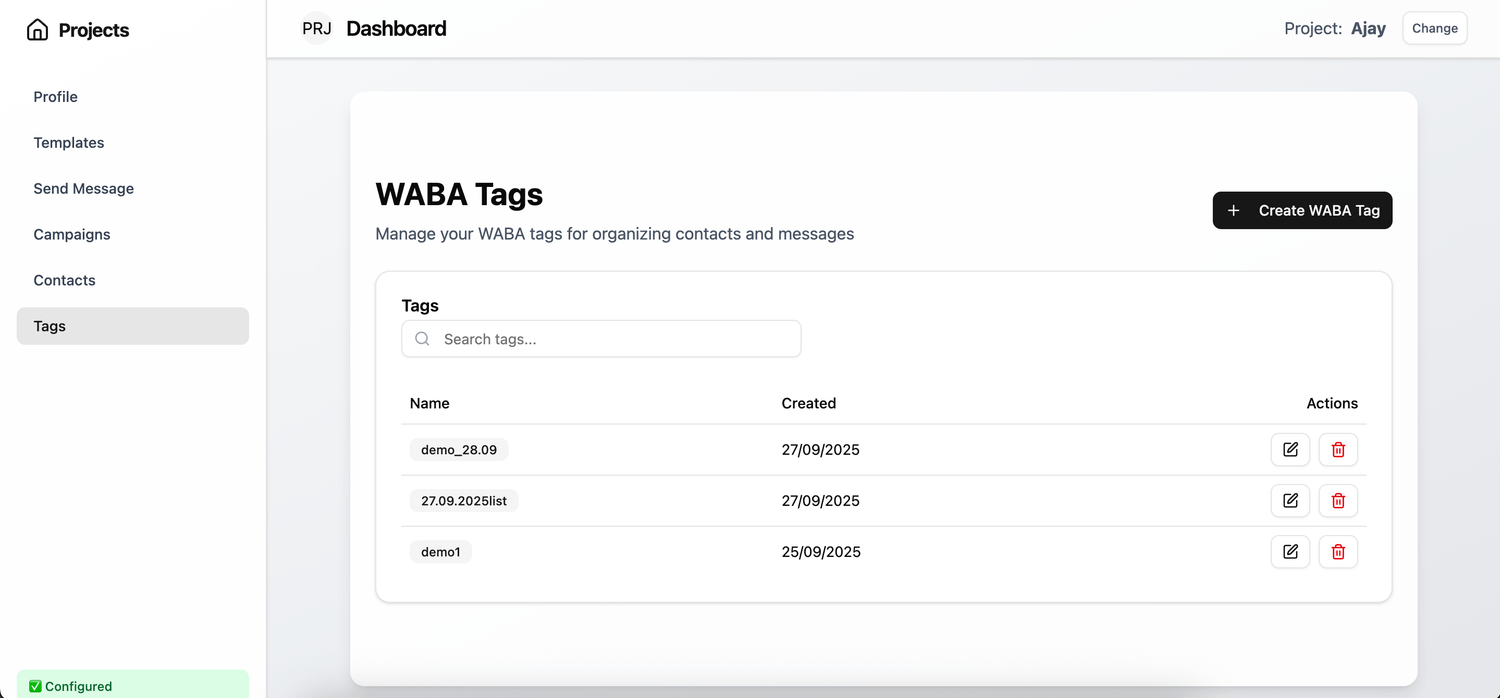
Smart Targeting
Tag people as "Hot Lead", "Attended 3 Times", "Needs Discount". Send specific messages.
Benefit: Higher conversion
Real Impact Numbers:
Message delivery rate
Higher webinar show-up
Extra revenue per year
Faster than manual

Send WhatsApp Messages Even When People Leave Webinar, With Zoom Integrations
WLH connects your Zoom account in the system, and it allows you to send WhatsApp API approved templates when you start a webinar, when people leave the webinar, and sends a different set of messages to people who have attended and haven't attended the webinar - That too on total automations, No Human Needed!
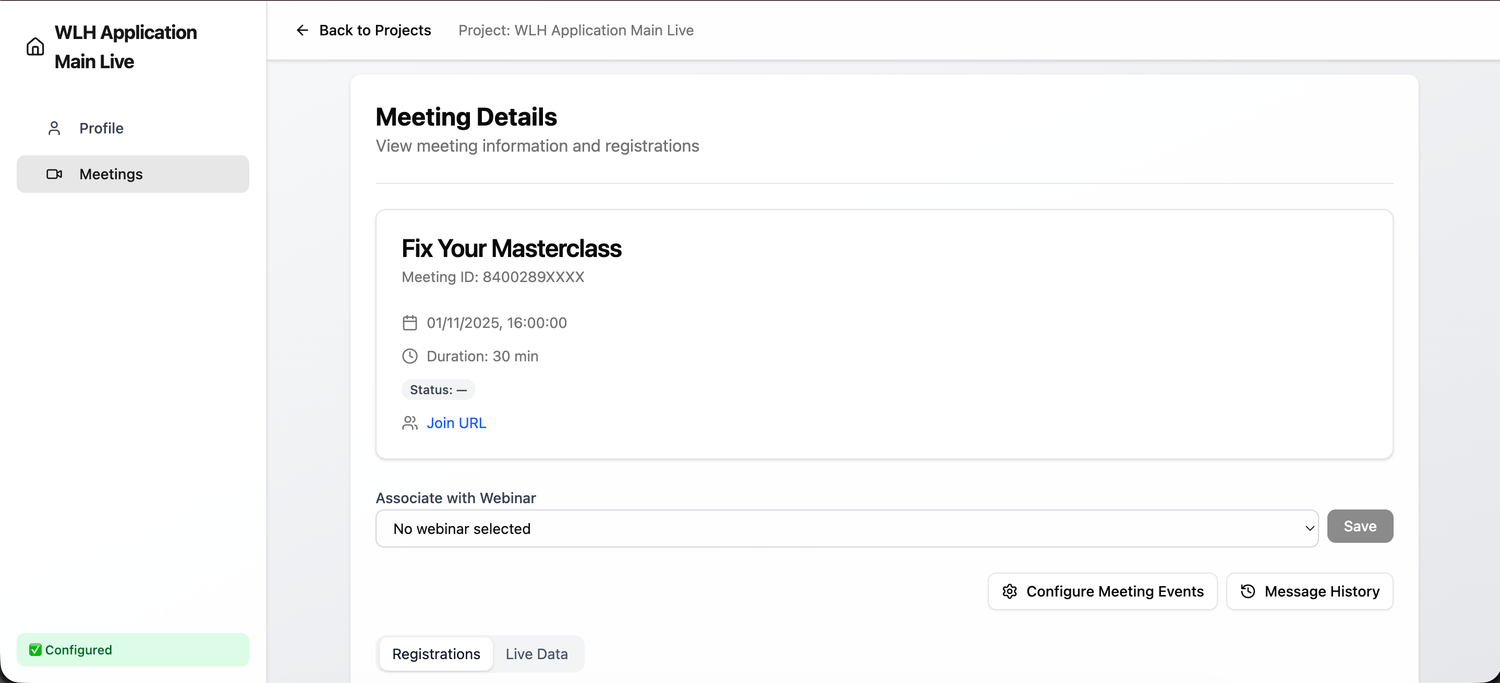
Find Your Zoom Meeting in WLH
Under WLH Zoom Application, you can find all your scheduled Zoom Meetings and associate them with webinars created in WLH.
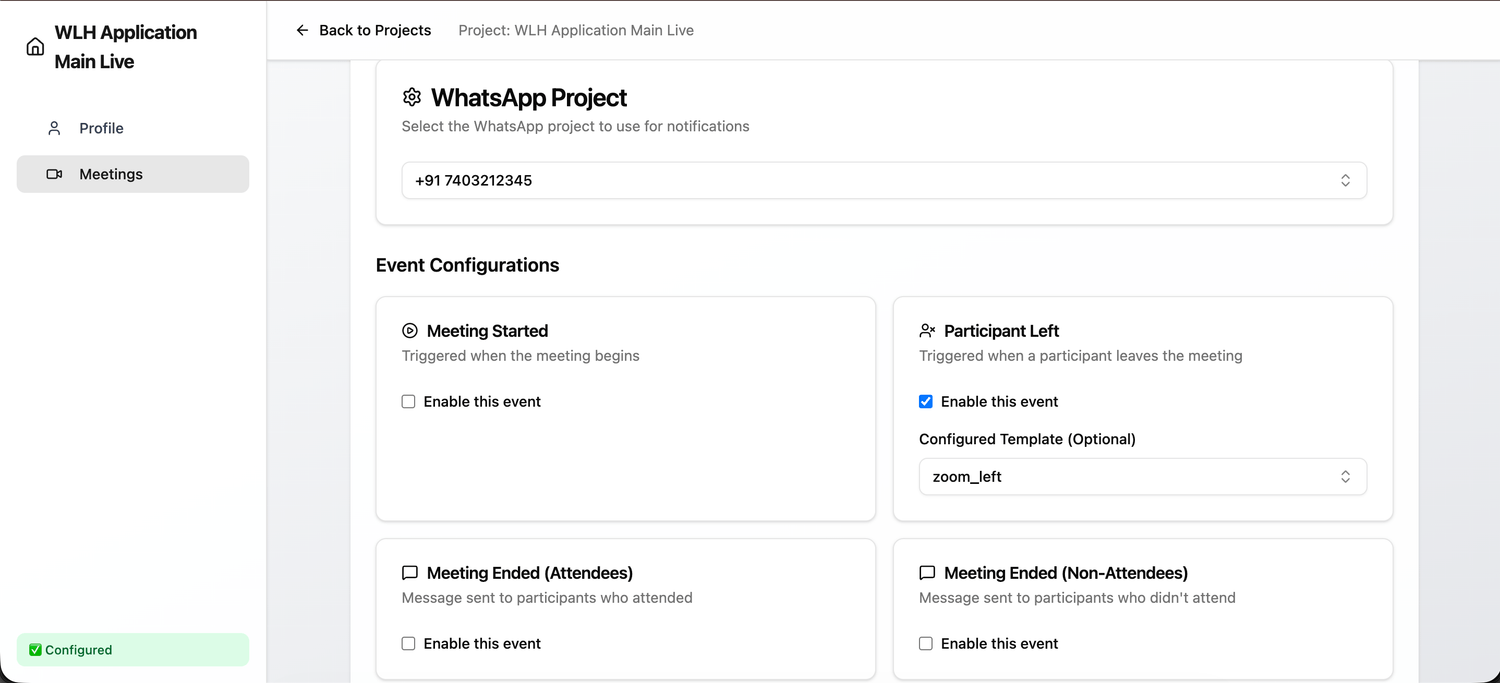
Trigger a WhatsApp Template
Configure your WhatsApp API with Zoom and trigger template messages based on webinar events automatically.
Catch Lazy Team Members Before They Cost You ₹10 Lakhs
Are they really making 50 calls a day? Or just lying to you? WLH tracks EVERYTHING. No more excuses. No more revenue leakage.
The Problem Costing You Lakhs:
❌ "I made 50 calls today boss" (Reality: Made 5)
❌ Team members taking 2-hour lunch breaks
❌ 10-second "fake calls" counted as follow-ups
❌ Zero accountability = Zero performance
Financial Impact:
If 1 lazy employee costs you just 10 sales/month at ₹20K each = ₹24 Lakh lost per year
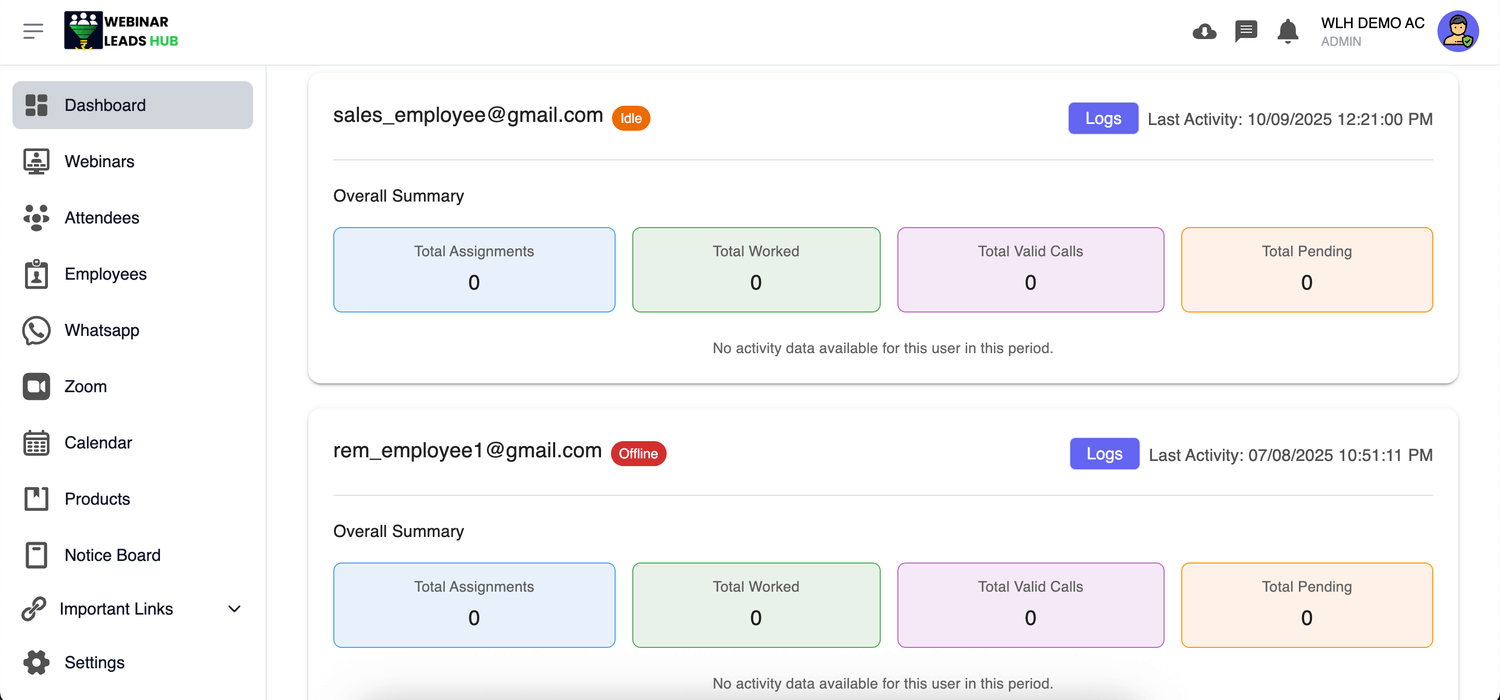
Know Exactly When They Work (And When They Don't)
- Login/logout tracked automatically
- IDLE time detection (sitting but not working)
- No lies. No excuses. Pure data.
See Every Call. Every Action. In Real-Time.
- Call duration logged (10 sec call = fake call)
- Every activity recorded in timeline
- Set minimum call time rules (e.g., 30 seconds)
Stop Hoping Your Team is Working. KNOW They Are.
The Math is Simple: Pay ₹3K, Make ₹3L Extra
Let's do the calculation: If WLH helps you close just 5 extra sales per month at ₹20,000 each, that's ₹12 Lakh extra per year. And you're paying just ₹33K for the year.
ROI: 3,636%
That's 36X return on investment
Good for Testing
Monthly Access
Cancel anytime
If WLH gets you 3 extra sales/month:
₹60K earned - ₹3.3K paid = ₹56.7K profit
- Create Webinars - Up to 100
- Employees - Up to 10
- Contacts - Up to 100,000
- Smart CRM + Auto-Assign
- Team Tracking + Call Validation
- WhatsApp Business API (1 number)
- Zoom Integration
- Revenue Analytics Dashboard
Perfect for trying out WLH
Best for Serious Coaches
Yearly Access
Save ₹6,567 vs Monthly
That's 2 months FREE
If WLH gets you 5 extra sales/month:
₹12L earned - ₹33K paid = ₹11.67L PROFIT
That's 36X return on your investment
- Everything in Monthly
- PLUS: Priority Support (24-hour response)
- Advanced Revenue Analytics
- Custom Integrations via API
- Product Performance Dashboard
- Top Customers Report
- Unlimited Saved Filters
Lock in this price forever
Our 30-Day Money-Back Guarantee
Try WLH risk-free for 30 days. If you don't make at least 3X your investment back, we'll refund you 100%. No questions asked.
Full Access
All features unlocked
Setup Support
We help you get started
100% Refund
If not satisfied
Still Unsure: Get On A Call With Team WLH
We will get on a call with you and share how Webinar Leads Hub can help your business after learning according to your business.